overview of seyagh project
Seyagh is software company that provides an integration platform for supply chain companies including logistic providers, manufacturers, wholesalers.
MY DESIGN PROCESS
Problem & Solution
Concept validation
Wireframe
User interview
what we detect
Customer and Partner onboarding takes up to 8 months starting from when the Statement of Work is signed. Besides unresponsiveness from the partners with the connection information and requirements, the process takes longer as multiple tools are used by different people. There is a lack of transparency among the team which takes multiple checkpoints to come to a common understanding and status.
how we fix it
One stop for all personas to view status, originate work, create reports, and communicate.
Automated notifications for partners and customers to remind them of their tasks and timeline.
Integrations with various tools - Project Management.
How might we streamline requirement gathering from Customer and Trading Partners?
Seyagh Persona
Seyagh provided us several existing meetings and interviews that have been recorded in the past. After watching several interviews with the team leader, we decided to create personas that represent the main parties involved in the onboarding process.

Behzad
SALE MANAGER

Parvaneh
SALE ACCOUNT REP

Soudeh
IMPLEMENTATION DEVELOPER

Amir
CUSTOMER SUCCES MANAGER
User pain point and Motivations
During the research phase we learned a lot about users and the main issues they face at Seyagh. Here’s a summary of each role regarding pain points and motivations.
"Not all customers are the same. it's difficult to standardize intake"
Sale manager
Pain points and frustrations
- Hands multiple account at a time – all with different needs
- Can be a bottleneck when initially setting up a contact
- Not all customers are the same-difficult to standardize intake
Goals and Motivations
- Collects technical requirement from the customer
- Deliver statement of work (SOW) to project management team
"We don't have visibility into the ins and outs of what engineers are doing in the tools"
Sale account rep
Pain points and frustrations
- Hands multiple account at a time – all with different needs
- We don’t have visibility into the ins and outs of what
- Lack of visibility in the beginning lead to chaotic outcomes in the process
Goals and Motivations
- Collects technical requirement from the customer
- Deliver statement of work (SOW) to project management team
"Main bottleneck really is confirming the proper contact to test with"
Implementation Engineer
Pain points and frustrations
- Trading partners don’t provides the required information on time, so the project gets delayed accordingly
- Flow up directly with trading partners or include customers to increase TP’s engagement
Goals and Motivations
- Support the team by completing initial connectivity testing and creating relevant documentation after testing
"Main bottleneck really is confirming the proper contact to test with"
Customer success manager
Pain points and frustrations
- The sales team can set wrong expectations for customers
- Resourcing issues, we over overstaffed, and its talking us to long
- Set up customers that don’t have it team to begin the process
Goals and Motivations
- Help customers identify ways to optimize engagement with Seyagh services
- Make sure customers business objectives are met
Synthesizing What We Learned
Affinity mapping helped us organize a large number of pain points and ideas. It was evident that the current process is very time consuming and manual. Streamlining and automating the project management and requirement gathering could potentially reduce unnecessary back- and-forth communications between teams and external partners.
Main Points
Customization: Seyagh allows each customer to customize the entire process.
Getting Requirements: Educating customers to provide the necessary specs for implementation.
Disjointed Process: The process lacks visibility. Teams seem disconnected and unaware task progress.
Customization
Every Trading Partner is unique, so only the beginning phase is standardized.
“Every customer is different” & “Every project is unique”
We see a lot of uniqueness that need to be accounted for across TPs
Not all our customers are well equipped to give us a spec and throw it over the fence to us. “We need to be more consultative with our engagement”
Big investment in terms of time is developing that business template
Sometimes I have to setup new IDs, fix current installations, including
VAN Installations, VAN to VAN, STP…
What does the library look like? How the team use it to improve the process?
Is it possible to determine these specs before the installation phase begins?
HMW help the internal team evolve the library so they can better manage all the uniqueness?
Getting Requirements
We need to improve how we communicate to set expectation with our Cs early on
Referencing the needs for those logical mapping specs. can be a huge long pole in the tent. We hear it all too often “We’re waiting on specs”
Biggest potential savings is refining how we approach our Cs when there are opportunities for setting expectations on a logical mapping spec
Sometimes a Third Party is involved, and it takes a long time to receive the info needed
Sometimes a bit of training with Customer is required
We don’t have visibility to what AS2 a TP is on… in cases when we work with mutual partners, this can cause a delay bc that’s information that they need to get
Sometimes the Trading Partners change the protocol
Disjointed Process
While I am taking care of the implementation process, someone in Data Transformation is preparing the Mapping Phase
Once testing is done, I’ll create the documentation for the Support Team
Clients can sign up for classes to learn more with the Seyagh Trainers
The pinpoint
Issues with Visibility/Traceability
The onboarding process involves a lot of people. Internal Seyagh Teams (Sales Op, Project Managers, Engineers, etc) and External Parties (Customer’s PM’s, IT Staff, Trading Partners, etc). We noticed that people involved in the project lack visibility of the process and that could potentially be the cause for delay.Issues with Communication/Documentation
There’s no transparency of communication between all parties. Communication is taking places in different forms (calls, emails, chat messages etc) which can be obstructed by lack of response from people involved.
Documenting the progress of a specific project is not centralized in one environment. There are different documents for different sections of the project which impacts efficiency.
One Environment
One stop for all personas to view status, originate and track the work progress, create report, and communicate with all parties involved in the project.Automation of Process
We propose automating some parts of the process, such as SOW documentation. Ready-made templates (forms, docs) to speed up communication between technical teams.- Efficiency of Communication
We’re proposing that all communication takes place in one environment where people involved (PMs, Engineers, Customers) will be instantly notified about the progression of the project.
Automation & Integration Concept
This concept provides the logical flow for each party involved in the Onboarding Process.
the idea is to streamline touchpoint through automation. Sale Op. Project Management, Implementation Engineering, Customers, and Trading Partners are brought to the same environment to tackle the issues with:
Creation of Statement of Work
A flow that represents Sales Op creating a new SOW.
Managing Existing Projects
Customization: Seyagh allows each customer to customize the entire process.
Implementing New Tasks
A flow showing the Engineering task at hand.
Annotated Wireframes
we created annotated wireframe is order to validate our design concept with Seyagh. we focused on addressing the main features that are necessary the one-environment efficient and transparent for all parties involved. there are three flow, sale Op, Project Management, and Implementation Engineering.
Sale Op
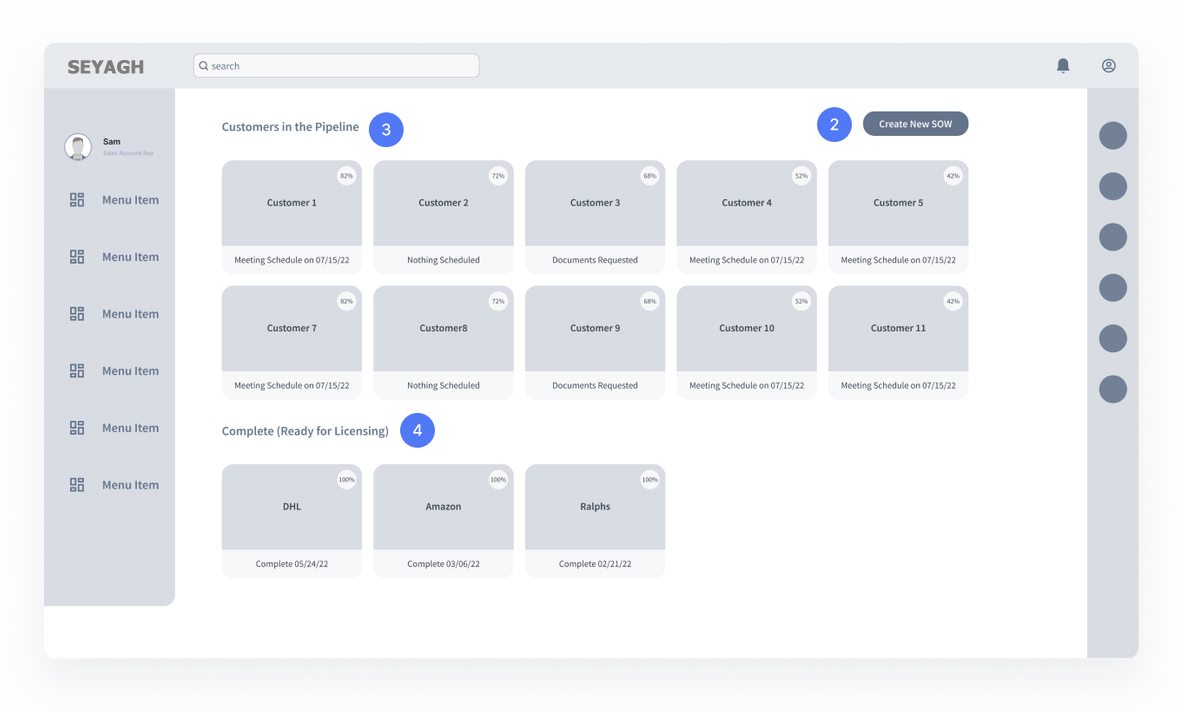
Sales Op Dashboard
Sales Op logs into account to create, resume, or view completed work on a statement of work.Create SOW
Generating SOW in this web application will automate fields for entire onboarding process.Current Projects
Displaying projects in a mosaic layout with the ability to change the display type.SOW Ready to Go
Sales Op has log of completed SOWs that are ready for Licensing’s enablement work to kick off Project Management.
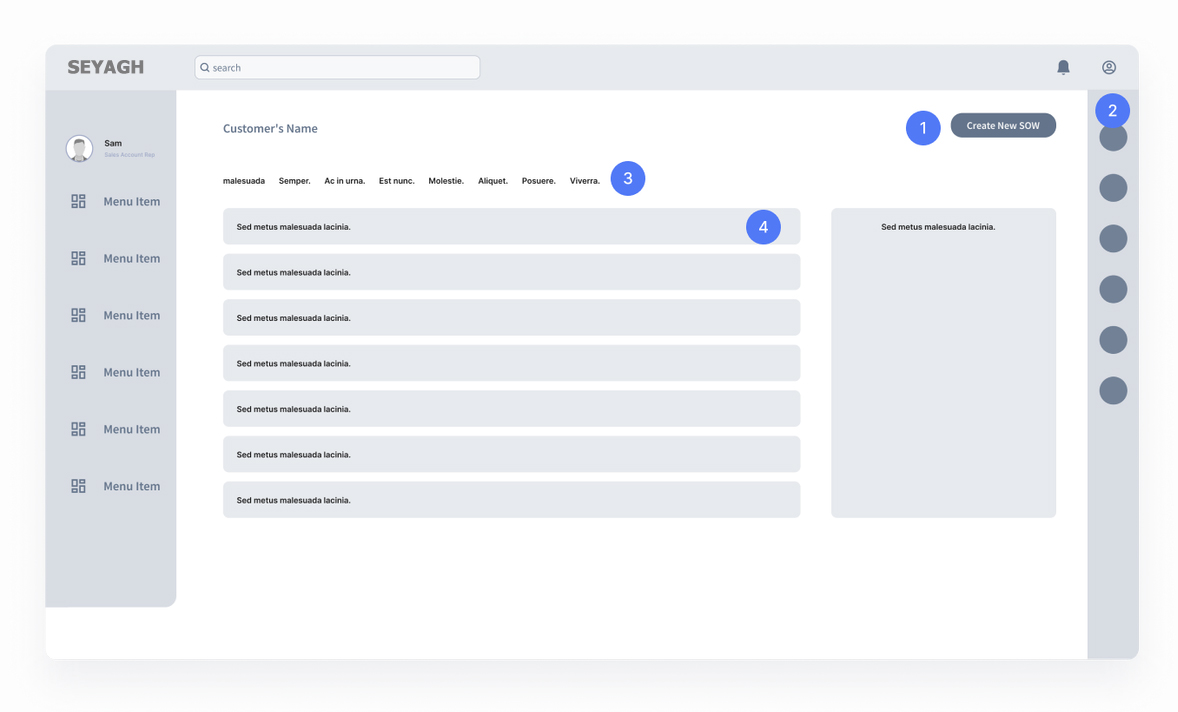
Create New SOW
After all steps were completed, the SOW can be generated.Recent Contacts
The latest contacts and people involved in this project will appear here.Visibility of Status | Pagination
This list indicates the necessary steps user must complete.Process Steps
Sales Op has log of completed SOWs that are ready for Licensing’s enablement work to kick off Project Management.
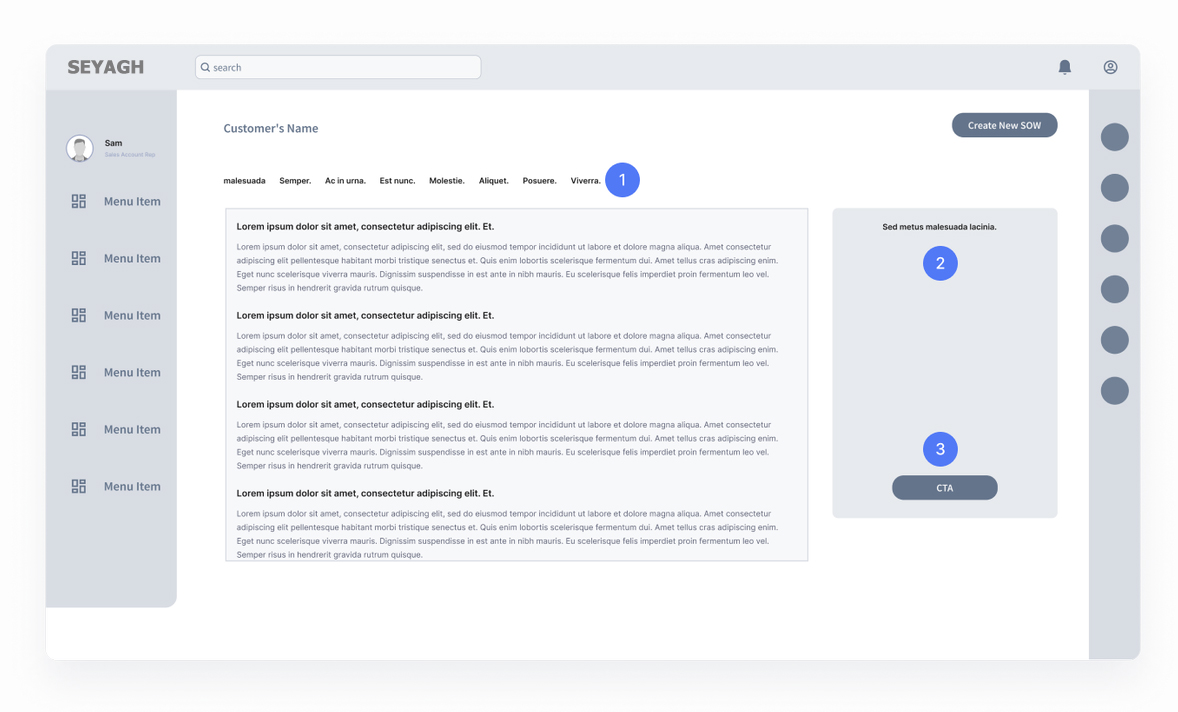
- Process Steps Complete
After all steps were completed, the SOW can be generated. - Notes
Sales Op, PM’s and Engineers have a place to write down important notes about the project. - CTA / Generate SOW
Once all steps are complete, Sales op can generate the SOW.
Project Management
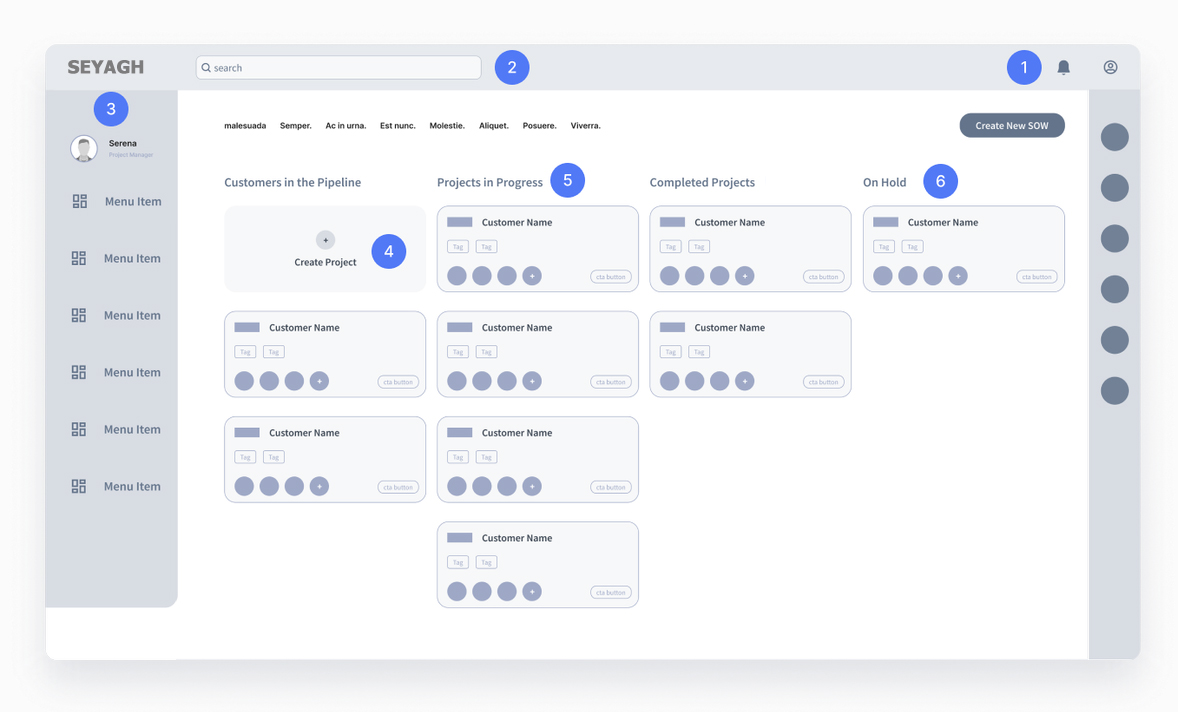
Project Manager (PM) Dashboard
Project Manager logs into account to create, resume, or view completed project work.Search
Functionality to browse or look up projects managed by PM.Fixed Navigation
Navigation for administrative actions and user setting or preferences.New Projects
Project managers can create new project boards from signed SOWs that are handed off from Licensing team.Ongoing Projects
Ongoing projects that are currently being onboarded and also indicates resources assigned to the project. These cards are color coordinated to indication project status.On Hold Projects
Some projects need technical assets and permissions in order to proceed to production.
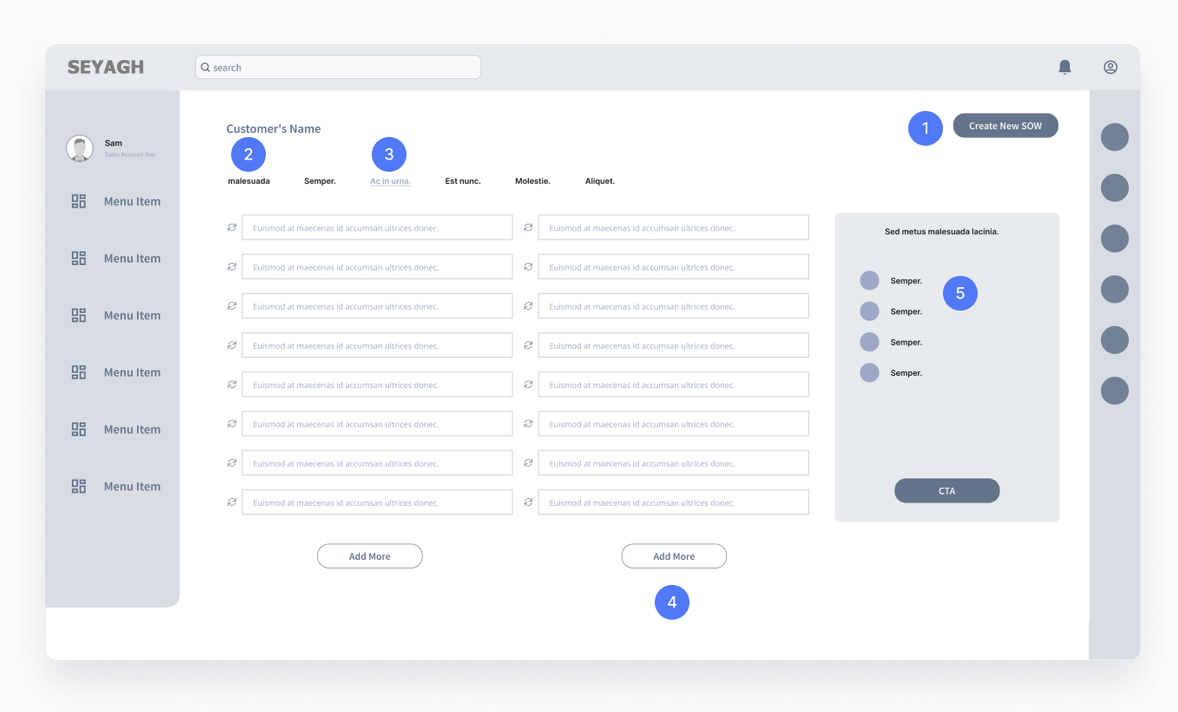
Create New SOW
After all steps were completed, the SOW can be generated.Visibility of Status | Pagination
This list indicates the necessary steps user must complete.Active Step
The current step will be highlighted as a way to inform the users.Ability to Add Fields
In case there’s a need for PM’s to manually create a technical entry, the cta’s will always be available.Information Panel
Project managers will easily have access to see, add or remove team members to the task at hand.
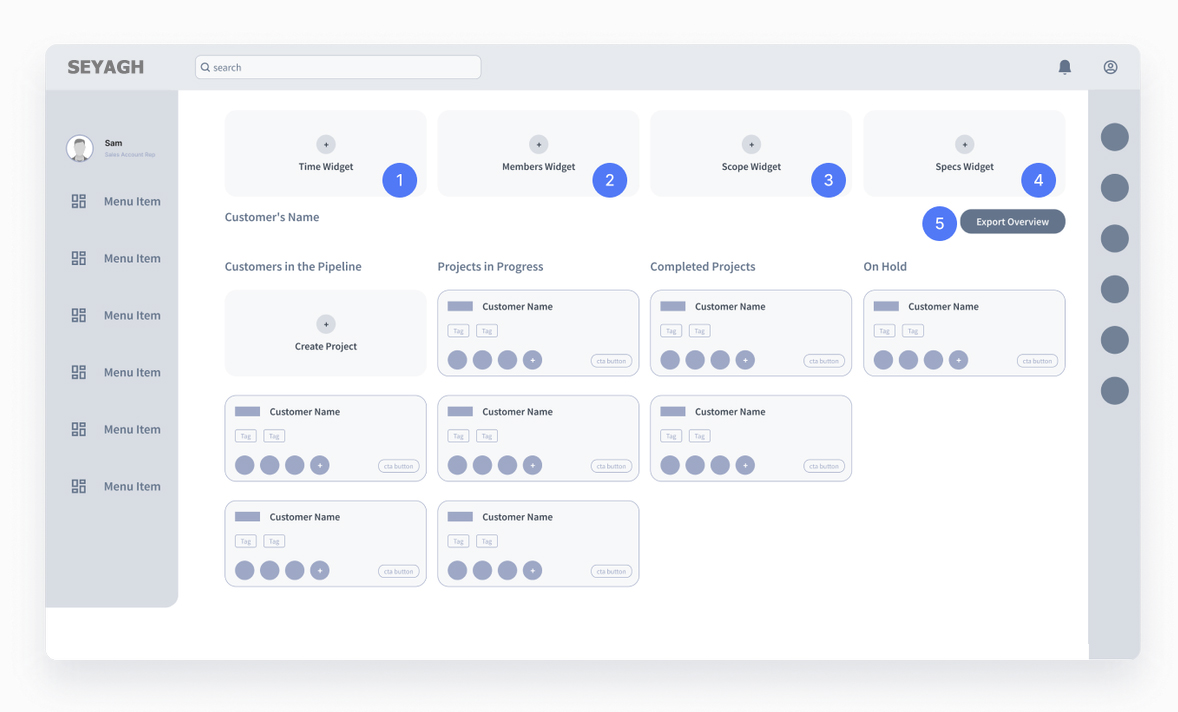
Project Time Log
This overview provides an at glance details for the project time projections and akin to Clarizen’s resource time logging.Project Resource
This overview provides an at glance details for the project resources such as engineers, account executive and customer success manager.Project Status
This overview provides an at glance details for the project status based on a summary of task completions.Project Specs
This overview provides an at glance details for the specs – trading partner and map counts involved in the project.
Engineering
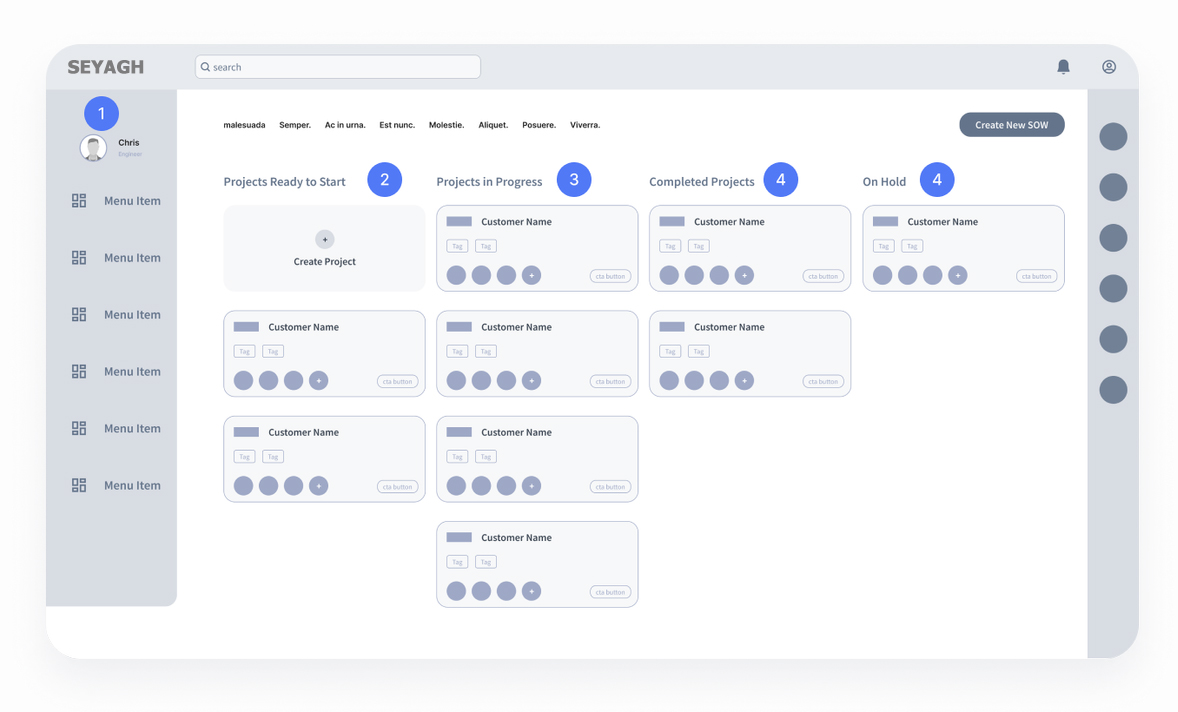
Engineering Dashboard
Engineers log into their account to create, resume, or view completed project work.Projects Ready to Start
Engineers can create a project manually in case they haven’t been assigned yet. Here’s where ready to start projects stored.Projects in Progress
Engineers are working on multiple projects at once. Here they can see their tasks and if there was any status update.Completed Projects
Ongoing projects that are currently being onboarded and also indicates resources assigned to the project. These cards are color coordinated to indication project status.On Hold Projects
Some projects need technical assets and permissions in order to proceed to production.
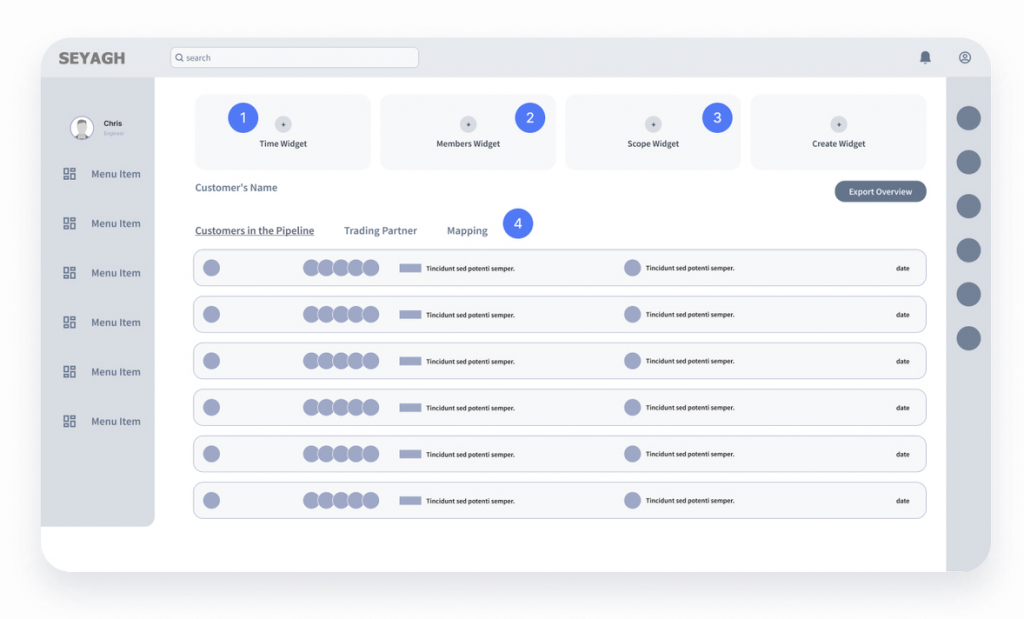
Project Time Log
This overview provides an at glance details for the project time projections and akin to Clarizen’s resource time logging.Project Resource
This overview provides an at glance details for the project resources such as engineers, account executive and customer success manager.Project Status
This overview provides an at glance details for the project status based on a summary of task completions.Customizable Widget
Engineers can also customize the widgets of the dashboard in order to address the current needs.Customizable Widget
Engineers can also customize the widgets of the dashboard in order to address the current needs.
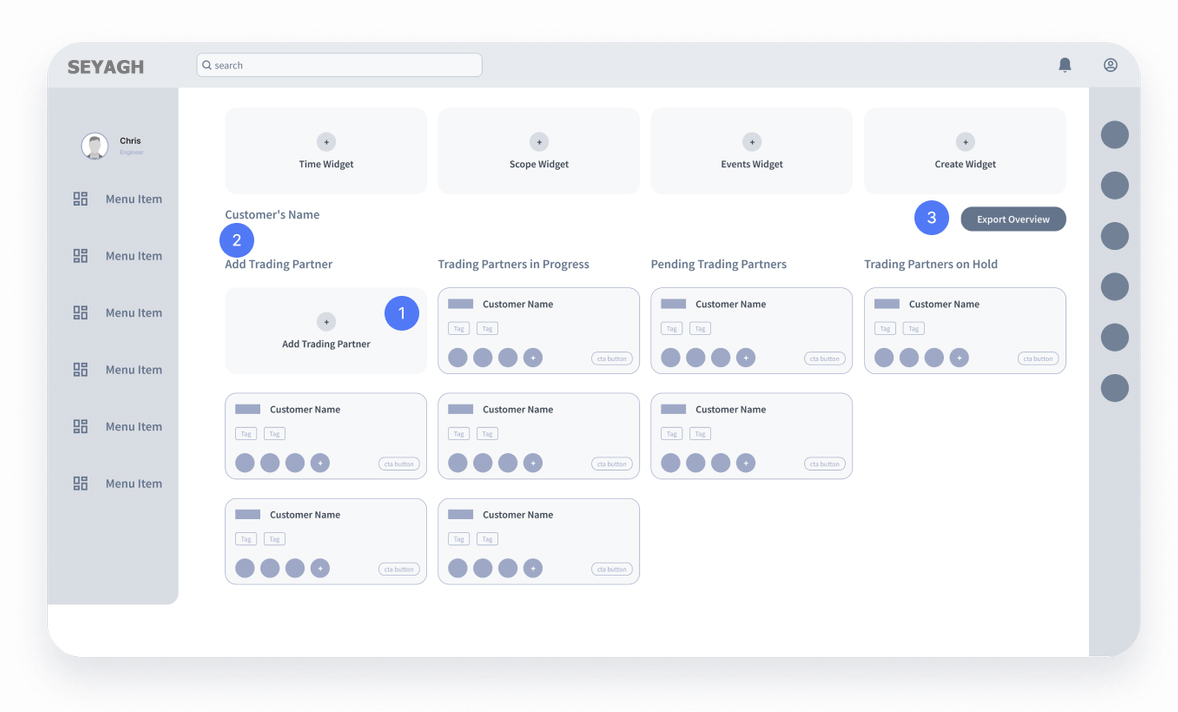
Adding a Trading Partner
Engineers can also add a trading partner manually. Once that task is done, all the parties involved will be notified.Trading Partner Status Column
The same structure follows: Trading partner column for tasks in progress, pending and on hold.CTA | Export to Cockpit
This is a very significant step. After tasks are completed, the project and all its information can be sent to Seyagh Cockpit, where they will end up eventually.
User Testing
After creating the annotated wireframes, we scheduled interview walkthroughs with several Seyagh employees. The overall feedback was amazing. Seyagh employees claim they would benefit immensely if this idea was ever implemented.
Finding
Severity / Urgency
UI recommendation
PMs are interested in being able to view project due dates and urgency from their main landing page.
Low
Consider adding a due date tag on the main page of all projects, and a “sort by due date” feature.
PMs usually have many contacts they need to keep track of across the different trading partners.
Low
On the TP details screen, consider adding a way for PMs to to add more manually.
All participants liked the color coding of different projects, as it reminded them of the current system in use. Most reported they would open the red first, as it indicated the most urgency.
Medium
With the current mental model around coloring and prioritization, users need additional cues of what to look at first. Adding a due date tag would help this decision- making process.
Engineer doesn’t understand
the prototype copy related to automation to apply to their current workflow.
Low
Change copy to reflect the current process better, from “Automate” to “Export to CIC” in the submission.
Seyagh engineers have two sub-personas: Data Transformation and Data Movement engineers, which each have some unique duties.
Medium
While separate views may not be needed, tasks for Data Movement and Data Transformation may need to be more specifically tagged and assigned.
Engineers like to see business
release details clarified, since there can be multiple projects for one company.
Low
Consider breaking out the TPs into BR1 in order to see groupings.
UI Design
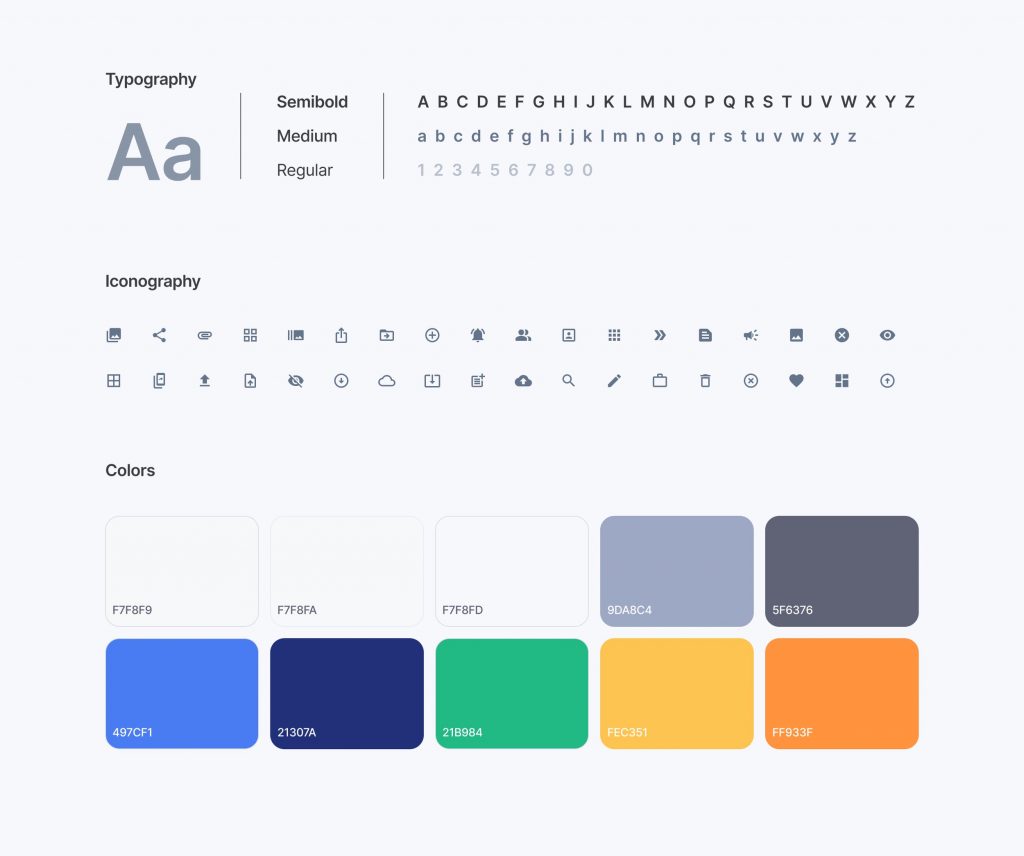
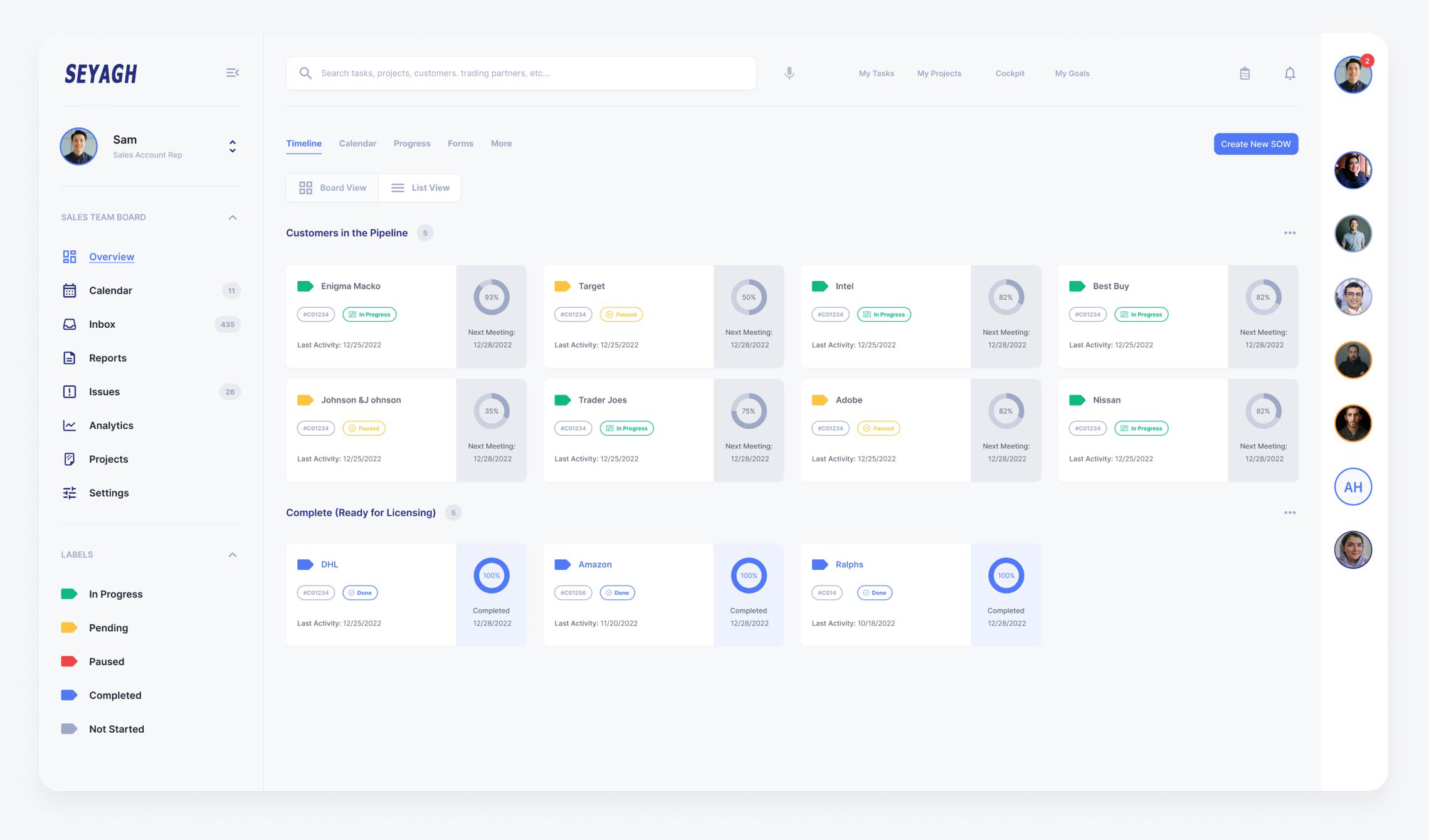
The main target audience of this dashboard environment is SEYAGH staff. i chose to maintain a very minimalist approach to the designs because dashboard can be very convoluted by nature. Seyagh is a logistics/technology company, so the designs tend to be a bit corporate and serious, conveying a sense of stability and safety to its users. There’s not much room to be playful with it, so my decision was to keep it simple but sleek and up to date.
Conclusion
– Working with Seyagh team was rewarding, but also challenging. Our Seyagh mentor did not have much access to the documentations and tools used by other teams involved. Some employees were not available for interviews, some staff were in a different timezone, or simply unavailable during the project, etc.
– The first three months revolved around research which happens to be beneficial to me. I learned a lot about the process, and I gained more familiarity with the steps required to develop substantial data in order to come up with a cohesive and efficient design solution.
– We only had a chance to work with the sales team, project management team and engineering team at Seyagh.
– Having access to real customers and trading partners would be crucial to gain a more holistic view of the process when external parties are involved.
– Ideally, Seyagh would benefit from continuing the research process, investigating what causes the onboarding process to delay, and if granted access – work with external parties to grasp on the main issues of this entire flow.